Matching Dispatch 3.2 and Sage 50 Material/Items
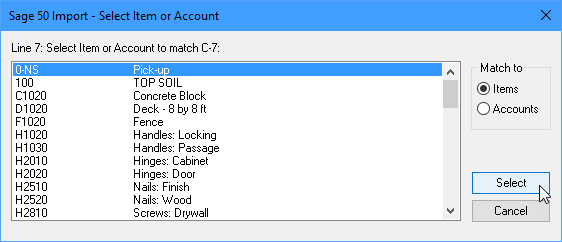
During the import process, when Sage can't find an Material/Item that has been used by Dispatch 3.2, you will be asked to select a match to an existing Item.
It will do this repeatedly for every single line of every invoice you are trying to import. It does not recall any match that you select. If an unknown Material/Item occurs 20 times in the invoice data, you will be asked to select a match 20 times. It is extremely tedious.
To avoid this, add the appropriate Material/Item codes to Sage before starting the Import Transactions Wizard.
Matching Material/Items to Customers
Sage also tries to match the Material/Item codes in the import file to those used by your Customers when they give you a Purchase Order.
If it can't find a match, it will ask you to specify a match using the Select Item or Account dialog (see above).
It will do this repeatedly for every single line of every invoice you have imported. It is extremely tedious.
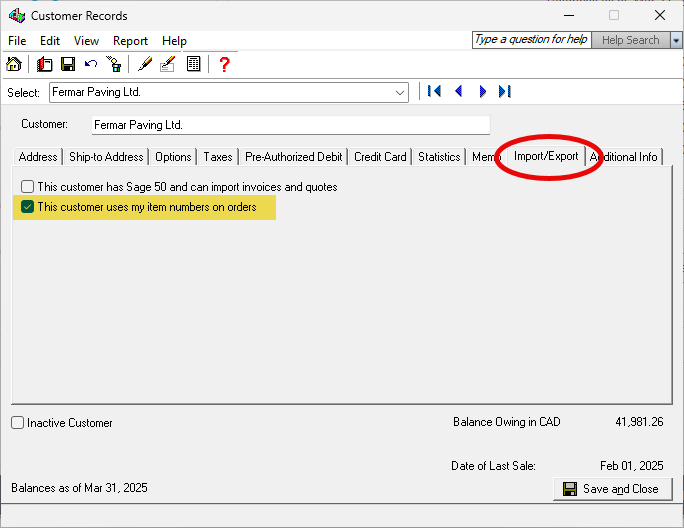
You can override that behavior by modifying your Customer Records to tell Sage that your Customers use your Item numbers.
Again, we recommended that you do this prior to starting the Import Transactions Wizard.