Open Registration settings panel by selecting Registration from the General group.

Why do I need a Registration code?
If you want to use Dispatch beyond the evaluation period you must register the software which requires a Registration code.
Evaluating Dispatch 3.2
If you are a new user, before making a decision to purchase, Dispatch will run for a limited period of time to allow you to evaluate whether it meets your requirements. We call that evaluation mode.
Without a registration code it will stop operating when the evaluation period comes to an end.
In evaluation mode, the only restriction is the period of time you can use Dispatch 3.2. There are no operational or feature differences when Dispatch 3.2 is running in evaluation or registered mode.
Most importantly: All of your data are safe even if the evaluation period ends. The database can be used as is should you choose to purchase the application.
What if I have already paid for Dispatch?
Every new Dispatch installation starts in evaluation mode. In fact, we cannot generate a Registration code until the software has been installed and you follow the Registration process. This is true if you are a new customer or an existing customer installing Dispatch on a new computer.
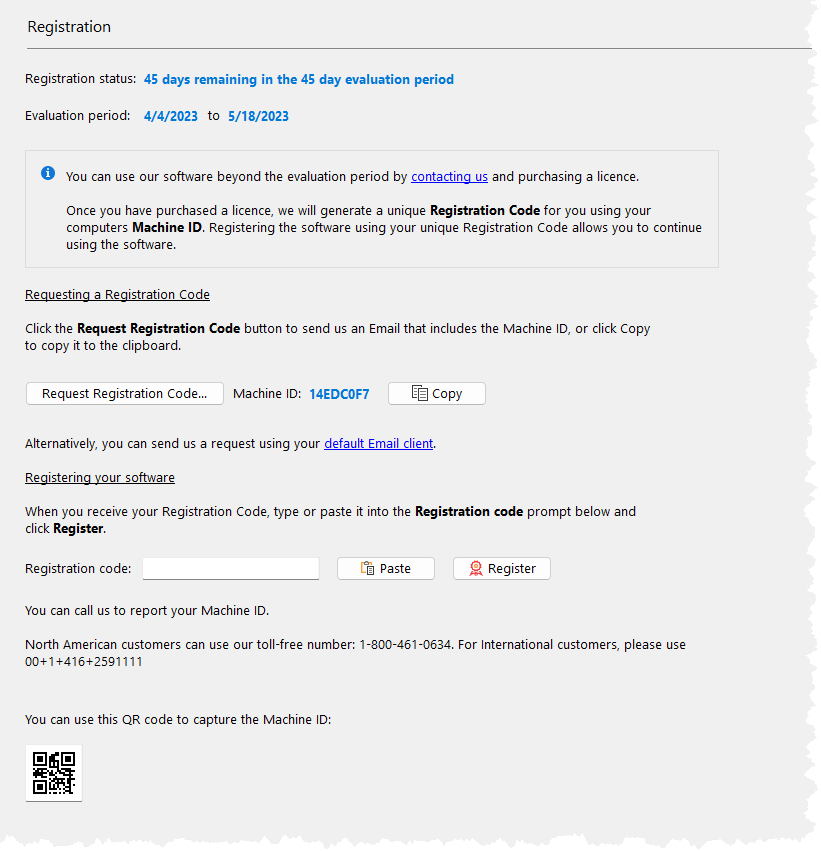
Sending a Registration Code Request
You can send us an email directly from Dispatch to request a Registration code. Simply click Request Registration Code, fill out the form (shown below) and click Send.
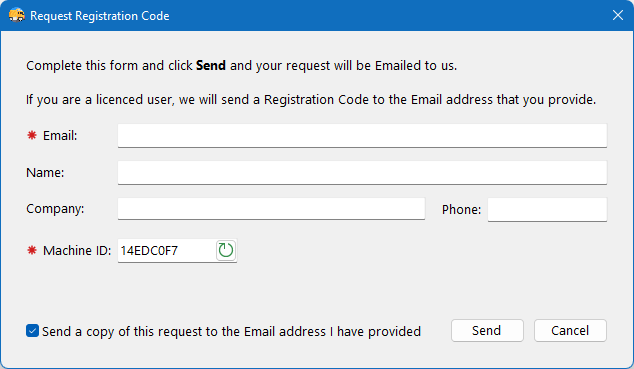
If you have purchased the software we will send you a Registration code to the email address that you provide.
If you cannot connect the computer that is running the application to the internet, simply copy down the Machine ID and email it to us using your own email client whenever it is convenient. We will send the Registration code in a reply email.
Do I need to buy a new licence when I replace my computer?
No. Install the evaluation software again, send us a Registration Code Request and we will send you a new Registration code.