SQLite is a self-contained, high-reliability, embedded, full-featured, public-domain, SQL database engine.
All Dispatch data are stored in a single file SQLite file.
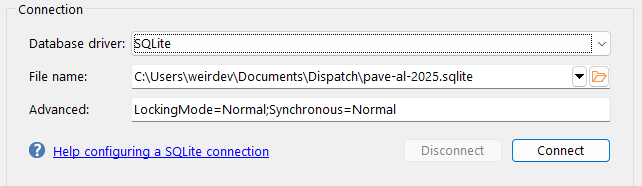
Database driver
Database driver must be set to SQLite.
File name
The location and name of the database file.
If the database does not exist, a new one will be created. Once the database has been created, Dispatch will connect to the database and create all the database objects (e.g. tables, procedures, triggers) that it requires.
Advanced
The Advanced property can be used to specify key/value pairs to configure the database driver.
For example, to allow multi-user access to a database, include LockingMode=Normal. To disable multi-user access, use LockingMode=Exclusive.
You also can use the Advanced property to specify advanced SQLite database connection options using the SQLiteAdvanced keyword.
SQLiteAdvanced can contain multiple values as long you enclose the key and values within double-quote characters.
For example:
"SQLiteAdvanced=locking_mode=NORMAL;synchronous=NORMAL;auto_vacuum=1;page_size=4096"
SQLiteAdvanced can be combined with other named key/value pairs too:
LockingMode=Normal;Synchronous=Normal;"SQLiteAdvanced=auto_vacuum=1;page_size=4096"